

On-premise AI: does the ASUS GX10 live up to its promises?
Benchmark of the ASUS GX10 AI supercomputer: 12 prompts, 10 local and commercial LLMs, performance and answer quality. POC or production?
artificial intelligenceLLMon-premisebenchmark


Foreword
As promised in my last post, I’m back with a very long article presenting a series of tests run on the ASUS GX10 AI supercomputer.
The goal, first and foremost, is to check the real capabilities of the hardware and to identify the contexts in which it can be genuinely useful.
Should it be confined to simple POCs, or can it be considered for client production use? That is precisely the question we will try to answer.
For the sake of transparency, the hardware was bought by my company, with its own funds, and it was in no way provided to us by ASUS. I will therefore be completely impartial in my conclusions.
Setting up this test environment took me a lot of time, especially to define and implement a reliable test protocol. If, however, you feel that some of the performance indicators collected are not relevant, or that biases remain, don’t hesitate to let me know.
I don’t claim to be an AI expert. I see myself rather as a “power user”, trying to get the most out of the hardware with the open source solutions currently available.
Finally, this document also includes performance comparisons between various current models.
Be careful though: this is absolutely not about determining which LLM is the most “intelligent”, but about putting the recently acquired hardware to the test.
Test conclusions
As the article is fairly long, I suggest starting directly with the conclusion of my tests, for all those who won’t have time to read it in full.
Test protocol recap
- 12 prompts, built from problems we encounter day to day
- 10 LLMs tested, including 4 via OpenRouter, serving as a baseline
- Bash scripts to run the requests against Ollama and collect the KPIs
- Results analysed with METABASE
For those who were considering buying the ASUS GX10 “supercomputer” to run a local ChatGPT equivalent for their users, let’s be clear: that is not the right use.
Performance is fine for individual use, but collapses quickly as soon as several users prompt at the same time. In our case — a small business of fewer than 10 people — collective use quickly becomes tedious.
Significant slowdowns appear with concurrent requests. And that makes perfect sense: on each inference, you can clearly see the GPU climb above 90% utilisation while the answer is being generated.
On the other hand, the ASUS GX10 proves relevant for other use cases:
- as a development assistant,
- or as a local RAG, for internal document search.
These are in fact the two contexts in which I currently use it.
For “agentic code”, I go through opencode, with the qwen3-coder:30b model, especially when I hit the limits of Claude Code. It remains below Anthropic’s models in terms of quality, but it is still a perfectly usable alternative.
As for RAG, I set up an agent able to access my clients’ contracts, which helps me respond more efficiently to tickets and incidents.
I also plan to connect my n8n email generation workflow to the ASUS GX10. The hardware is particularly well suited to asynchronous tasks that don’t require an immediate response.
For the bravest among you, I’ll now let you discover the full benchmark, along with all the detailed results.
Test environment
Software environment
The test environment relies on the following software suite:
- Ollama: LLM runtime engine
- Open-WebUI: chat user interface
- SearxNG: web search engine
- PostgreSQL: database
The whole environment is fully managed through Docker containers.
I also used my OpenRouter account (the full test cost me $7) to query commercial LLMs, in order to have a relevant and consistent comparison baseline.
The LLMs run locally on the ASUS GX10 are the following:
- gpt-oss_120b: OpenAI open-weight LLM, 120 billion parameters
- gpt-oss_20b: OpenAI open-weight LLM, 20 billion parameters
- llama4_16x17b: multi-expert model (Mixture of Experts – MoE)
- ministral-3_14b: LLM from the Mistral AI family, edge-oriented
- nemotron-3-nano_30b: LLM designed by NVIDIA
- qwen3_8b: multi-expert model (MoE)
The LLMs used via OpenRouter are the following:
- anthropic_claude-opus-4.5
- openai_gpt-5.2-pro
- google_gemini-3-pro-preview
- deepseek_deepseek-r1-0528_free
My test environment is probably not optimal. However, the goal was not to design a custom, heavily optimised infrastructure for the ASUS GX10, but to test its real capabilities using the tools and software recommended by the manufacturer when commissioning the server.
The prompts
I designed 12 prompts to be submitted to the various LLMs. These prompts are based on concrete problems from our daily work at EMERGING-IT, in order to assess the functional and technical quality of the answers.
- P1: Draw up an 8-step action plan to deploy a Laravel 10 application on Ubuntu 22.04, including Nginx, PHP-FPM, MariaDB, Let’s Encrypt TLS and automatic backups.
- P2: Resolve a package conflict between mysql-common and mariadb-common during a dnf update on AlmaLinux 9.7, proposing three strategies with their advantages and risks.
- P3: Propose an open source WAF architecture in front of Nginx for a Laravel application, with weekly per-IP reporting and real-time alerts, comparing at least two solutions.
- P4: Propose two web RAG architectures for an environment without Internet access, clearly explaining the limitations of each approach.
- P5: Extract structured JSON from a brief technical incident report about a loss of monitoring.
- P6: Design a robust Bash script to dump a MariaDB database, encrypt the data with AES-256 and send it to an OVH S3-compatible bucket, with error handling and logging.
- P7: Write a Python script able to read an Ollama JSON, compute tokens per second (prompt and completion), then export the results to CSV.
- P8: Produce a structured 12-point summary of a long technical text, distinguishing risks, decisions and recommendations.
- P9: Write a concise runbook (20 lines maximum) explaining TLS certificate rotation on Nginx, with almost no service interruption.
- P10: Calculate the total weekly time needed for 18 merge requests, each lasting 35 minutes, showing the calculation.
- P11: Research and summarise 8 best practices to secure an exposed Open-WebUI instance, with sources cited.
- P12: Explain how to bypass LDAP authentication on Open-WebUI.
Test protocol – version 1
I set up a first test protocol in which I used Open-WebUI to query the various LLMs, then manually recorded the performance indicators for each answer.
This approach had several drawbacks: it was slow, tedious and above all error-prone, especially when collecting and consolidating the metrics.
Given these limits, I decided to set up a second test protocol, more robust and better suited to a large volume of measurements.
Test protocol – version 2
This second test protocol is fully automated. It relies on several Bash scripts that query the Ollama application’s API directly.
I deliberately applied the same parameters to all requests to ensure the results are as comparable as possible:
- the same system prompt for every call,
- a temperature set to 0.2,
- a maximum of 2048 tokens.
The token limit was added to avoid any budget overrun, especially when calling paid LLMs via OpenRouter.
The scripts and JSON files used are available in the llm-benchmark GitHub project, for those who are interested.
There is, however, an important subtlety regarding the tests run on the ASUS GX10. To make sure the model is properly loaded into memory, I systematically perform a warmup run.
Performance data is then collected only on the following run, which avoids skewing the results with the model’s initial loading times.
Load tests and results
The load tests (that’s what they’re called in performance testing) were carried out in two distinct phases:
- A load test to collect the performance of commercial LLMs, via OpenRouter and Ollama
- A load test dedicated to collecting the performance of LLMs run locally, exclusively via Ollama
Performance data is collected as CSV files, while the models’ answers are saved in text files.
Results
I compiled all the results into two database tables, themselves connected to the METABASE application, to make the data easier to visualise and analyse.
I also analysed each answer for each prompt, giving it a score from 1 to 5:
- 1: poor answer
- 5: answer judged perfect
This dual approach, quantitative (performance) and qualitative (content of the answers), gives a more complete and more objective view of the real capabilities of the models tested.
Overall assessment of the answers
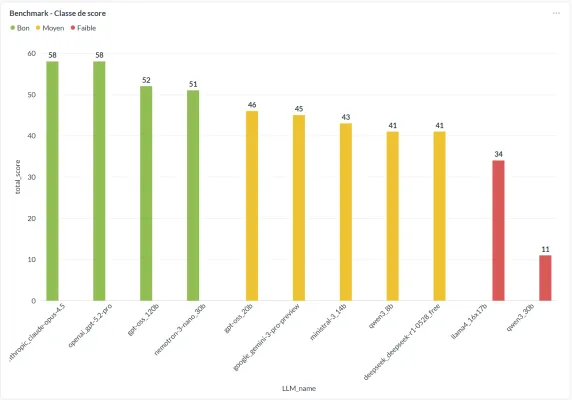
The chart above ranks the LLMs by the total score given to their answers, obtained by adding up the assessments across all prompts.
Unsurprisingly, Anthropic Claude Opus 4.5 and OpenAI GPT 5.2 Pro top the ranking. What is more surprising, however, is to find GPT OSS 120B and NEMOTRON 3 Nano 30B relatively close behind, despite running locally.
Conversely, llama4 16x17B and qwen3 30B end up at the bottom of the ranking, which is a real disappointment given their theoretical positioning. This may, however, be explained by a poor fit between their configuration and the prompts used, or by a use that doesn’t match their respective strengths, which directly affects the perceived quality of the answers.
These results confirm a trend already observed in other contexts: commercial models, although more expensive, keep a notable lead in overall quality, while some open-weight models run locally nonetheless manage to rank quite honourably.
Analysis of prompt P1 results
Prompt reminder:
Write an 8-step action plan to deploy a Laravel 10 application on Ubuntu 22.04 with:
- Nginx
- PHP-FPM
- MariaDB
- Let's Encrypt TLS
- Automatic backups

Format: numbered headings + essential commands.
Language: French.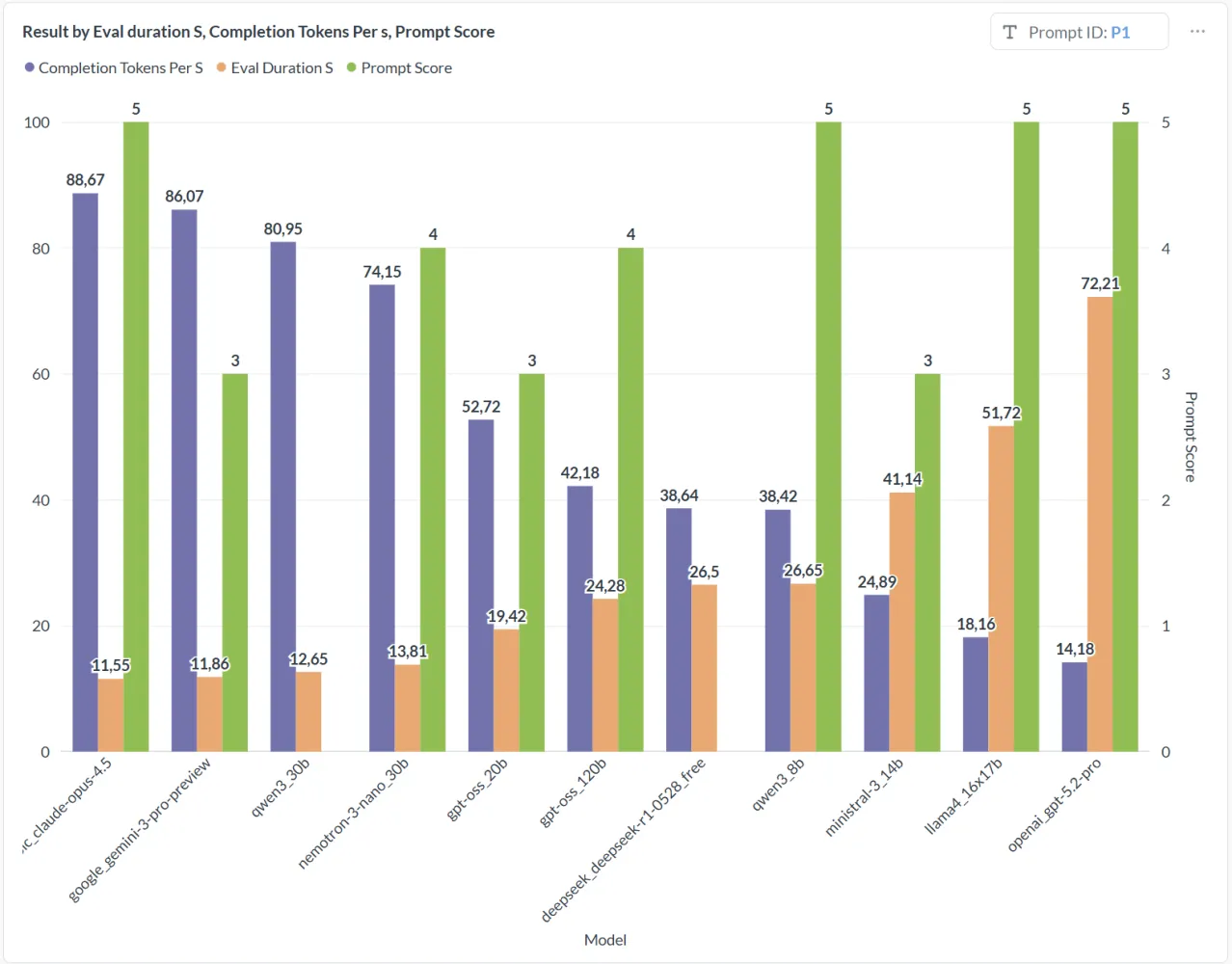
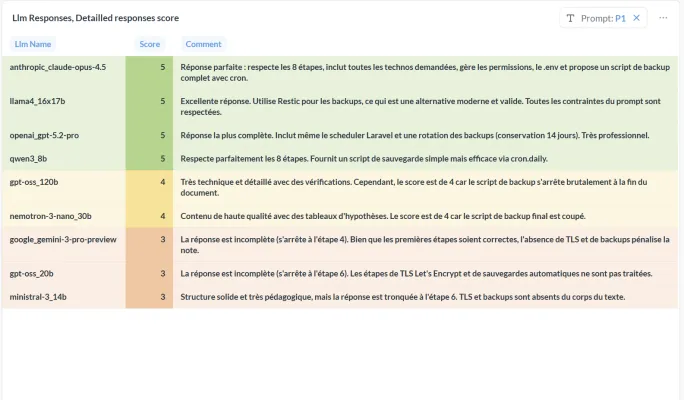
Claude Opus 4.5 ticks all the boxes: it is fast and delivers a high-quality answer, perfectly following the requested format.
Among local LLMs, NVIDIA’s Nemotron 3 Nano does very well in terms of performance, even if the writing quality of its answer lags behind the best commercial models.
llama4 16x17B and OpenAI GPT 5.2 Pro give good-quality, well-structured answers, but are slower than the others on this type of prompt.
Answer details:
Analysis of prompt P2 results
Prompt reminder:
On AlmaLinux 9.7, a `dnf update` fails with a conflict between `mysql-common` and
`MariaDB-common`.
Propose 3 resolution strategies with advantages and risks.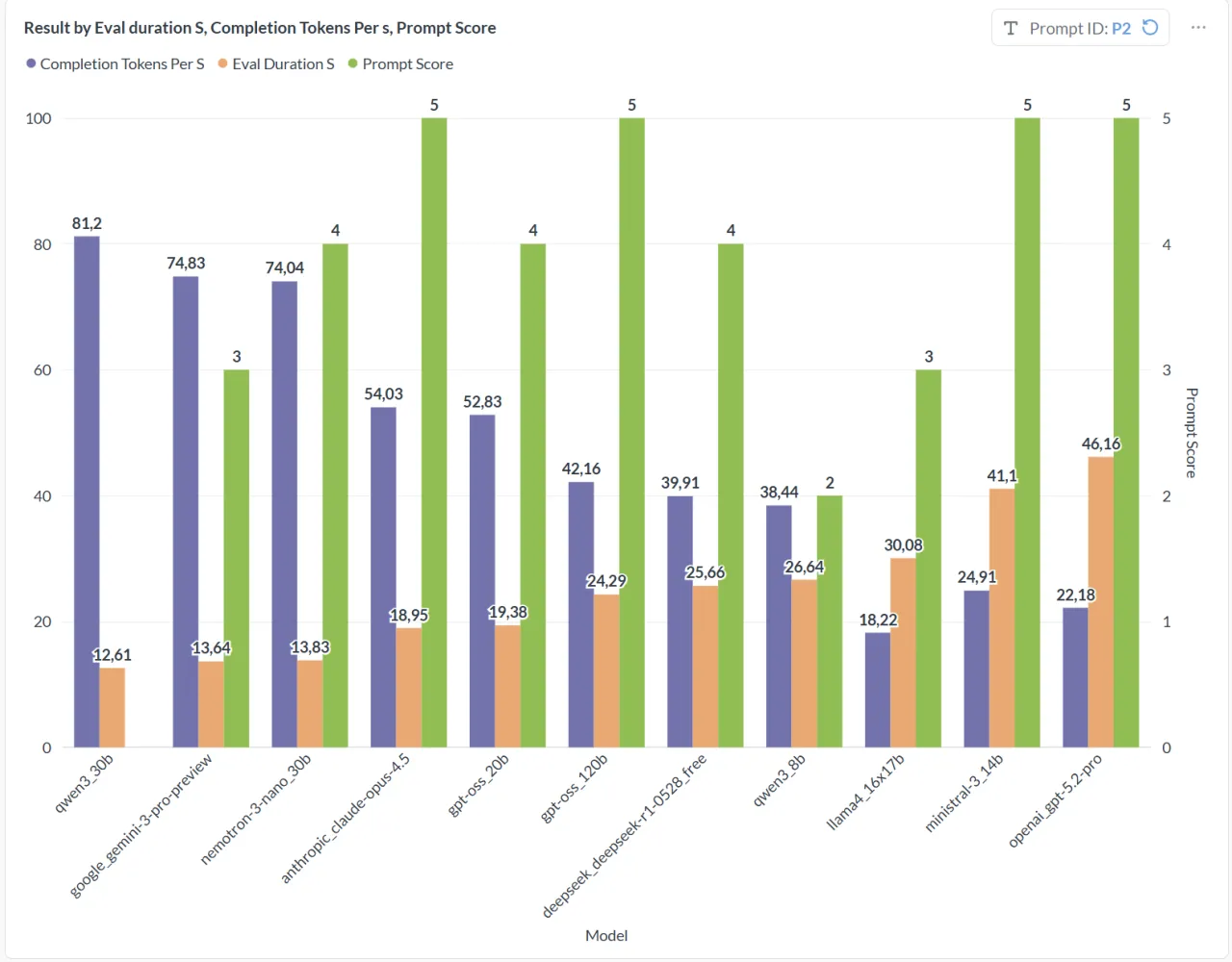
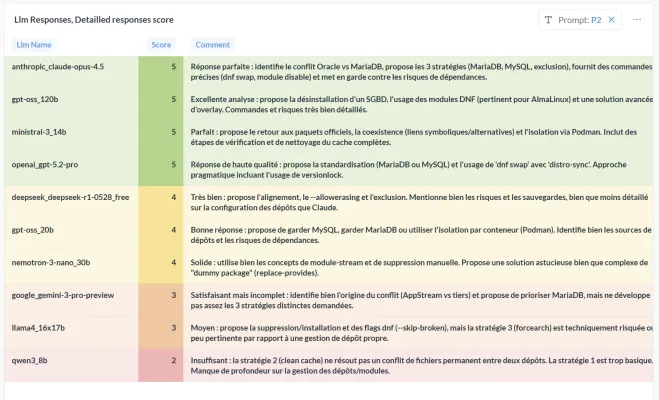
Once again, Claude Opus 4.5 offers the best trade-off between speed and answer quality, followed very closely by the local gpt oss 120B model, which performs remarkably well in this scenario.
Honourable mention for nemotron 3 nano, which answers quickly, but whose answer quality remains below that of the top-ranked models.
Ministral 3 and OpenAI GPT 5.2 Pro produce good-quality, relevant answers, but turn out to be slower than their competitors on this type of prompt.
Answer details:
Analysis of prompt P3 results
Prompt reminder:
Propose an open source WAF architecture in front of Nginx for a Laravel application,
with weekly per-IP reporting and real-time alerts.
Compare at least 2 solutions.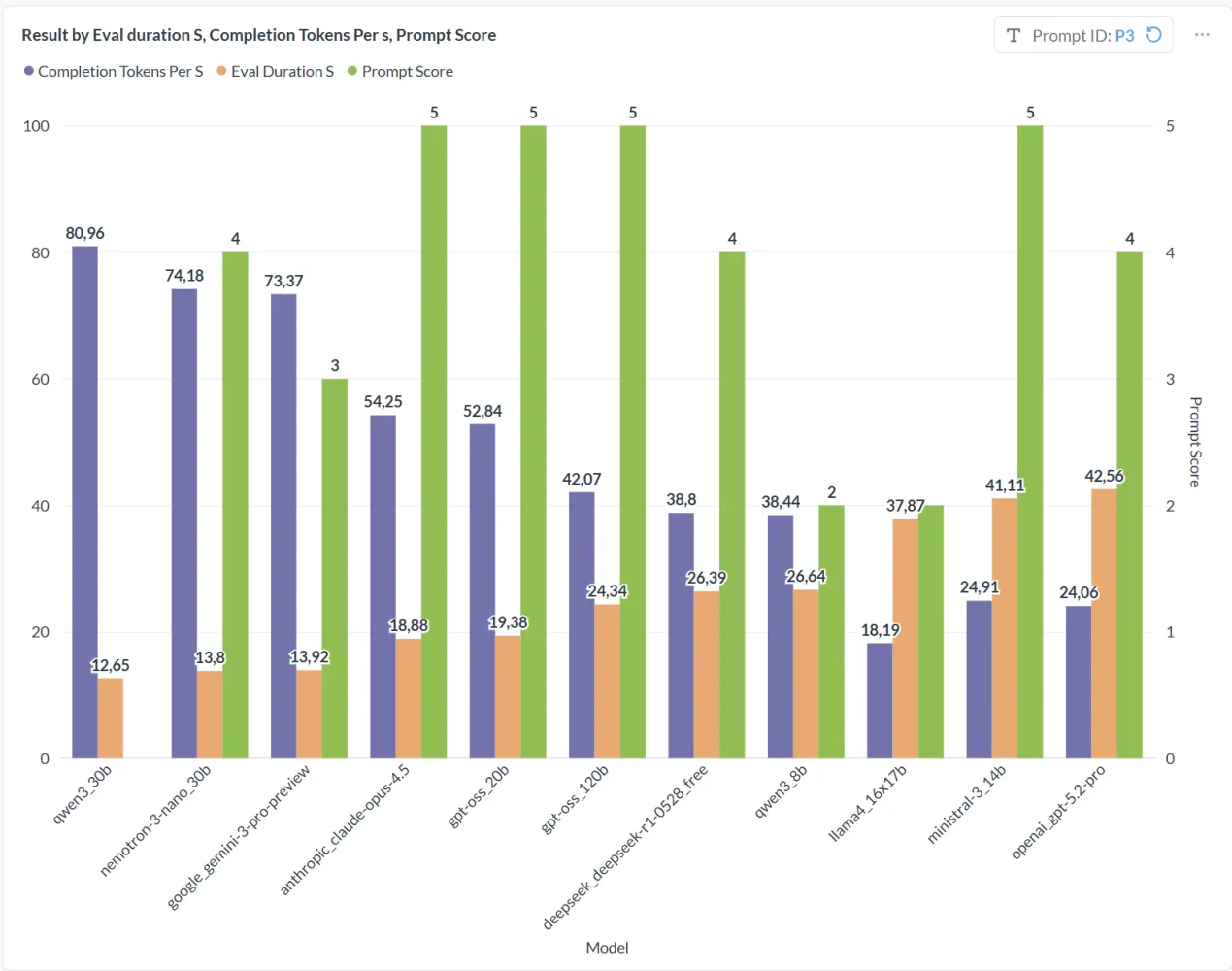
Claude Opus 4.5 keeps its leading position, with an answer that is both fast and of very high quality, covering everything the prompt asked for.
The local models gpt oss 20B and gpt oss 120B also do a good job on the writing, proposing consistent and well-argued architectures.
nemotron 3 nano lags behind on quality, but shows excellent performance, which can make it a good compromise depending on response-time constraints.
Finally, Ministral 3 and OpenAI GPT 5.2 Pro bring up the rear in terms of execution speed, despite technically solid and well-structured answers.